- საწყისი გვერდი /
- ელექტრონიკა /
- Computer Accessories /
- Networking Products /
- Network Adapters /
- USB Network Adapters /
- WiFi 4 USB Nano Wireless Network Dongle Adapt...
0 ratings


ერთეულის #:
65562519
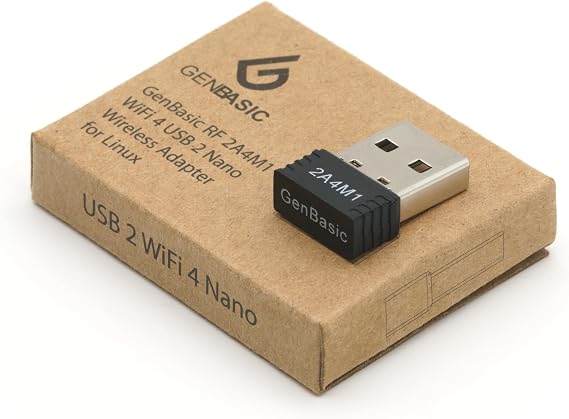
WiFi 4 USB Nano Wireless Network Dongle Adapter for Linux (Black)
ერთეულის #:
65562519
GEL 51
Price Details
Excluding Shipping & Custom charges ( Shipping and custom charges will be calculated on checkout )
*All items will import from აშშ
0 ratings
დაწერეთ მიმოხილვა
Საწყობში
 იმპორტირებულია USA მაღაზიიდან
შეუკვეთეთ ახლავე და მიიღეთ Monday, აგვისტო 24
Secured transaction
Ubuy works hard to protect your security and privacy. Our advanced payment security system ensures confidentiality by encrypting your information during transmission using AES (Advanced Encryption Standards) and SSL (Secure Socket Layer) protocols. Your payment details are 100% secure as we do not share your payment details with third party sellers.
Our Top Logistics Partners


Small plug and play 2.4GHz WiFi for single board computers with up to 150Mbps speed.

Fast
Shipping

Free
Return*

Secure Packaging

100% Original Products

PCI DSS Compliance

ISO 27001 Certified




Note: Step Down Voltage Transformer required for using electronics products of აშშ store (110-120). Recommended power converters იყიდე ახლა.


What Stands Out
Compact Design
The WiFi 4 USB Nano Dongle's small size makes it highly portable, allowing users to seamlessly connect to networks without clutter, perfect for laptops and on-the-go use.
Linux Compatibility
Designed specifically for Linux users, this adapter ensures easy integration and reliable performance, addressing common connectivity issues that other adapters may overlook.
Enhanced Connectivity
Featuring WiFi 4 technology, this dongle provides strong, stable connections, enabling users to enjoy smooth streaming and browsing experiences without disruptions, even in densely populated areas.
Პროდუქტის აღწერილობა
| Brand | GenBasic |
| Number of Packs | 1 |
| Unit Count | 1 Count |
| UPC | 647923366945 |
| Number of Items | 1 |
| Manufacturer | GenBasic |
| Built-In Media | USB Nano Dongle |
| Model Number | 2A4M1 |
| Mfr Part Number | 2A4M1 |
| Hardware Interface | 802.11 b/g/n, Radio Frequency, USB, USB 2.0, USB 2.0 Type A |
| Compatible Devices | Desktop |
| Data Link Protocol | IEEE 802.11b, IEEE 802.11g, IEEE 802.11n, USB |
| Data Transfer Rate | 150 megabits_per_second |
| Compatible Operating System Family | Linux, MacOS, Windows |
| Minimum Required Operating System Version | Ubuntu 22.04 Jammy Jellyfish |
| Color | Black |
| Item Dimensions L x W x H | 0.75"L x 0.5"W x 0.2"H (1.9 x 1.3 x 0.5 cm) |
| Item Weight | 0.02 kg |
| Product Dimensions (L x W x H) | 0.75"L x 0.5"W x 0.2"H (1.9 x 1.3 x 0.5 cm) |
Who Should Buy?

-
Linux Users
Ideal for Linux users who need an affordable, plug-and-play solution for wireless connectivity without complicated setup.
-
Space-Saving Setup
Perfect for users with limited USB space or portability needs, thanks to its tiny nano design that stays unobtrusive.
-
Budget-Conscious Buyers
Great for budget-minded individuals looking for a reliable and inexpensive solution for basic wireless networking needs.

-
Gaming Enthusiasts
Not suitable for gamers needing high-speed, low-latency connections, as WiFi 4 may not handle heavy data traffic well.
პროდუქტის აღწერილობა
WiFi 4 USB Nano Wireless Network Dongle Adapter for Linux (Black)
გაქვთ რაიმე შეკითხვა? მოგვმართეთ ჩათში
მომხმარებელთა კითხვები და პასუხები
-
კითხვა:
What is a WiFi 4 USB Nano Wireless Network Dongle Adapter?
პასუხი: A WiFi 4 USB Nano Wireless Network Dongle Adapter is a compact device that connects your computer to WiFi networks. It allows older systems or devices without built-in WiFi capability to access wireless internet. The dongle is designed for ease of use and portability, making it ideal for users needing a reliable wireless connection while on the go or in environments lacking network infrastructure. -
კითხვა:
Is the WiFi 4 USB Nano Dongle compatible with Linux?
პასუხი: Yes, the WiFi 4 USB Nano Wireless Network Dongle Adapter is compatible with various Linux distributions. It typically supports plug-and-play installation, allowing users to connect without extensive configuration. This makes it a perfect choice for Linux enthusiasts who require wireless connectivity without the hassle of complicated setups. -
კითხვა:
Can I use the WiFi 4 USB Nano Dongle with Windows or Mac systems?
პასუხი: While primarily marketed for Linux, the WiFi 4 USB Nano Wireless Network Dongle can also work with Windows and macOS systems. However, it's always best to check the specifications for compatibility to ensure a seamless experience. Its versatility makes it a good option if you switch between operating systems. -
კითხვა:
How do I install the WiFi 4 USB Nano Dongle on my Linux device?
პასუხი: To install the WiFi 4 USB Nano Dongle on a Linux device, simply plug the dongle into a USB port. Most modern Linux distributions will automatically detect the device and configure it for use. If any additional drivers are required, they can typically be installed via your distribution's package manager, ensuring a smooth setup process. -
კითხვა:
What kind of range can I expect from the WiFi 4 USB Nano Dongle?
პასუხი: The range of the WiFi 4 USB Nano Wireless Network Dongle Adapter largely depends on the router and environmental factors. Generally, you can expect a range of up to 150 feet indoors and more outdoors in unobstructed environments. Regular use cases include streaming videos, online gaming, or simply browsing the web from a distance within your home or office. -
კითხვა:
Does this dongle support high-speed internet connections?
პასუხი: Absolutely, the WiFi 4 USB Nano Wireless Network Dongle Adapter supports speeds up to 150 Mbps, making it suitable for most home and office activities. This capability allows users to stream videos in HD quality, participate in video conferences, and download files without frustrating slowdowns, provided that the internet speed from your service provider is equal to or higher. -
კითხვა:
Can I use multiple WiFi Dongles simultaneously?
პასუხი: Yes, you can use multiple WiFi Dongles simultaneously on a single device, provided that your operating system supports it. This can be useful for load balancing or connecting to different networks. Scenarios may include needing a secondary connection for redundancy or using one dongle for specific tasks while another handles general browsing. -
კითხვა:
What should I do if the dongle is not recognized by my Linux system?
პასუხი: If your Linux system does not recognize the WiFi 4 USB Nano Dongle, ensure that it is properly inserted into a working USB port. Additionally, check for driver updates compatible with your distribution. Referencing community forums can sometimes provide solutions if conflicts or specific configurations are needed, ensuring you’ll get connected quickly. -
კითხვა:
Where can I buy WiFi 4 USB Nano Wireless Network Dongle Adapter for Linux Black?
პასუხი: You can purchase the WiFi 4 USB Nano Wireless Network Dongle Adapter for Linux Black on Ubuy. Ubuy offers a wide selection of electronic products, ensuring you not only find what you need but also have access to detailed product descriptions and customer reviews. -
კითხვა:
Is the adapter suitable for gaming?
პასუხი: Yes, the WiFi 4 USB Nano Wireless Network Dongle Adapter is suitable for casual gaming. With speeds up to 150 Mbps, it can support online gaming sessions effectively if your internet plan provides sufficient bandwidth. Ensure your gaming setup is within the range of your router for optimal performance during gameplay.
GenBasic USB Network Adapters 2A4M1 Editorial Review
The GenBasic WiFi 4 USB Nano Wireless Network Dongle Adapter for Linux Black is a small, lightweight WiFi adapter that is supported by all Linux versions since 4.4 as long as they have the MT7601 module enabled. It is a plug-and-play device that requires no complicated installation process; simply plug it into the USB port of your computer and it should be recognized immediately. Customers have reported that this WiFi adapter works seamlessly with their Raspberry Pi and Libre Computer Board. It is also compatible with most PCs, but it is important to note that it is not supported by the PS4 gaming system. One drawback of this dongle is that it only works on a 2.4 GHz network and is not compatible with 5 GHz networks. However, for users who do not have a 5 GHz network, this should not be a problem. Overall, the GenBasic WiFi 4 USB Nano Wireless Network Dongle Adapter for Linux Black is an affordable and user-friendly option for those in need of a wireless connection for their Linux computer.
Customer Reviews & Ratings
1 მომხმარებლის შეფასება
-
5 ვარსკვლავი
100%
-
4 ვარსკვლავი
0%
-
3 ვარსკვლავი
0%
-
2 ვარსკვლავი
0%
-
1 ვარსკვლავი
0%
ამ პროდუქტის მიმოხილვა
გაუზიარეთ თქვენი აზრები სხვა მომხმარებლებს
Დადებითი
- Plug-and-play device
- Works seamlessly with Raspberry Pi and Libre Computer Boards
- Affordable price
მინუსები
- Not compatible with PS4
Platform Trust & Buyer Confidence

MA
Mohammad
Verified buyer
“Excellent quality and original too,when ubuy send original things I will appreciate that ,I very satisfied thank you”
23 July 2026 · via Trustpilot
CK
Chitra
Verified buyer
“The order and delivery progress was communicated very well. Package arrived within the estimated time. Products arrived as expected in good condition.”
22-Jul-26 · via Trustpilot
K
kund
Verified buyer
“Good supply of products. Safe payment methods, and shipment worldwide! Genuine products.”
23-Jul-26 · via Trustpilot
OO
Onesi
Verified buyer
“Was my first time buying a product from Ubuy, but I found it so helpful. This is reliable. Gonna place a new order!”
22 July 2026 · via Trustpilot
SJ
SAO JOHN
Verified buyer
“Ubuy is a great online platform to buy stuff. Reliable, fast delivery time and great value for money. I've been using Ubuy online shopping platform for three years now and will continue to do so.”
23 July 2026 · via Trustpilot
უსაფრთხო კონტროლი
Global Delivery
Easy Returns
Genuine Products
Product Price History
მნიშვნელოვანი ინფორმაცია
- შეზღუდვები: გთხოვთ, გაითვალისწინოთ, რომ საზღვარგარეთ გაგზავნილი პროდუქტებისთვის მწარმოებლის გარანტია შეიძლება არ იყოს მოქმედი; მწარმოებლის მომსახურების პარამეტრები შეიძლება არ იყოს ხელმისაწვდომი; პროდუქტის ინსტრუქციები და უსაფრთხოების გაფრთხილებები შეიძლება არ იყოს დანიშნულების ქვეყნის ენაზე; პროდუქტები (და მასთან დაკავშირებული მასალები) შეიძლება არ იყოს შემუშავებული დანიშნულების ქვეყნის სტანდარტების, სპეციფიკაციებისა და მარკირების მოთხოვნების შესაბამისად; და პროდუქტები შეიძლება არ შეესაბამებოდეს დანიშნულების ქვეყნის ძაბვისა და სხვა ელექტრო სტანდარტებს (საჭიროების შემთხვევაში საჭიროა ადაპტერი ან გადამყვანი). მიმღები პასუხისმგებელია უზრუნველყოს, რომ პროდუქტი კანონიერად შემოიტანოს დანიშნულების ქვეყანაში. Ubuy-ს ან მისი აფილირებული პირების მეშვეობით შეკვეთისას მიმღები არის რეგისტრირებული იმპორტიორი და მან უნდა გაითვალისწინოს დანიშნულების ქვეყნის ყველა კანონი და დებულება.
- Ubuy-ზე ჩამოთვლილი ყველა პროდუქტი არ არის გაყიდვაში, რადგან Ubuy არის გლობალური საძიებო სისტემა და პროდუქტები ექვემდებარება საექსპორტო/სავაჭრო რეგულაციებს.
GEL 51
შეუკვეთეთ ახლავე და მიიღეთ Monday, აგვისტო 24
This item is not restrict in my country.(Please click on above link if this item is not restrict in your country, So our team will review and allow.)
QTY:
Secured transaction
PCI DSS compliant and ISO 27001:2022 certified, with encrypted payments and full buyer protection on every order.
Our Top Logistics Partners
Fastest cross-border delivery
მახასიათებლები და უპირატესობები
- Plug and play 2.4GHz WiFi for single board computers
- Up to 150Mbps speed
- Supports latest WPA3 security standards
- Advanced functionality including AP mode and monitoring/sniffing mode
- Compatible with Linux LTS versions and Windows
- Low power design within USB 2.0 ports' 500mA power budget
Ubuy Assurance
Experience worry-free shopping with 100% original products, PCI DSS-compliant payment security, ISO 27001-certified data protection, the fastest cross-border delivery, free returns *, and secure packaging on every order.