Telephone Types for Home, Office, and Everyday Calling
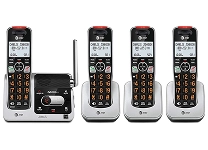
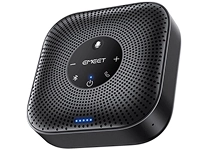
Telephones range from straightforward home handsets to feature-rich business systems, so the best type depends on where and how calls are made. Corded landline phones provide a handset connected to a base, while cordless models let callers move around within the base unit's signal range. VoIP phones place calls over an internet connection and are common in offices and home workspaces. Conference phones are designed to capture voices around a shared table, and mobile phones combine calling with messaging, apps, and other connected features. Some telephone systems support multiple handsets or extensions from one base, helping households and teams manage calls across rooms. Before comparing models, consider the number of users, expected call volume, available telephone or network connection, and whether portability, hands-free calling, or shared access matters most.
- Corded, cordless, VoIP, conference, and mobile options
- Choose based on setting, users, and connection type
- Multi-handset systems can serve several rooms
Telephone Features That Make Calls Easier
Useful telephone features can improve call clarity, accessibility, and everyday convenience. Look for caller ID, a visible call log, speed-dial keys, contact storage, and a speakerphone if hands-free conversations are important. On cordless handsets, display size, keypad layout, backlighting, and menu simplicity affect usability. Adjustable ringtones and volume controls can help suit different rooms and hearing preferences, while mute, call waiting, intercom, and voicemail functions support busy households or offices. For internet-based calling, check network connection options, headset support, audio controls, and whether the phone works with the intended calling service. Business users may benefit from programmable line keys, directory access, call transfer, and conference functions. Ubuy offers a place to discover international telephone models and compare feature sets; verify that a model's connection and service requirements match your setup before choosing.
- Check caller ID, speakerphone, and contact storage
- Prioritize readable displays and accessible controls
- Confirm service and network requirements
Corded and Cordless Phones: Range, Power, and Setup
Corded and cordless telephones suit different calling habits. A corded handset stays connected to its base, making it a simple choice for a fixed desk or counter where a dedicated calling position is preferred. Cordless phones pair one or more portable handsets with a base, offering freedom to move around at home or at work. Compare the number of included handsets, the ability to add compatible handsets, base placement, battery type, charging arrangement, and standby or talk-time information provided by the manufacturer. Cordless performance depends on the handset's supported technology and the environment, so consider walls, layout, and distance from the base. Check whether the phone connects to an analog telephone line, a compatible adapter, or another specified service. Panasonic, Gigaset, and VTech are recognizable names in home telephone products; compare individual model specifications rather than relying on brand alone.
- Corded models suit fixed calling locations
- Cordless handsets offer movement around a base
- Check line type, handset count, and battery details
VoIP and Business Telephones for Connected Work
VoIP telephones transmit calls through an internet connection and can support flexible setups for offices, remote work, and shared calling spaces. Some are dedicated IP desk phones, while others use an adapter or software-based calling service; compatibility depends on the service, network, and device specifications. Business models may include multiple line appearances, programmable keys, call transfer, directory access, headset connections, and conference calling. For a small team, assess how many users need individual extensions and whether the phone system supports the required call-handling features. Conference phones use microphones and speakers suited to group conversations, with performance influenced by room size and placement. Yealink and Cisco are established names associated with business communications equipment. Ubuy can help shoppers explore international telephone options, but confirm service compatibility, supported protocols, and any required accessories with the phone and service documentation before purchasing.
- Match IP phones to the calling service
- Compare extensions, line keys, and headset support
- Choose conference equipment for the room and group
Telephone Compatibility, Accessories, and Care
A telephone works best when its connection, accessories, and supporting equipment are suited to the intended setup. Before buying, identify whether you need a traditional phone-line connection, an internet-based service, a compatible adapter, or a handset that pairs with an existing base. Check connector types and any stated network or service requirements. Useful accessories can include wired or wireless headsets, replacement batteries, charging cradles, handset clips, extension cables, and additional compatible handsets. For a multi-handset system, confirm that the base supports the extra handset model; similar appearance does not ensure compatibility. Keep handsets and charging contacts clean and dry, follow the manufacturer's battery guidance, and place the base where its signal and cable connections are practical. For VoIP equipment, keep firmware and setup details aligned with the service provider's instructions. These checks help avoid choosing accessories or devices that do not work together.
- Verify connection type and handset compatibility
- Check accessory fit before adding or replacing parts
- Follow care and battery instructions
Select the Right telephones
Start by defining the main use: occasional household calls, a shared family line, a dedicated work desk, or a team communication system. Then compare connection type, handset quantity, portability, call volume, and essential functions such as caller ID, speakerphone, voicemail access, or call transfer. Consider who will use the phone and whether large buttons, a clear screen, simple menus, or headset support would make calls more comfortable. Check the dimensions and placement of the base, charging requirements, included cables, and compatibility with existing service or network equipment. If choosing between similar models, compare their documented features and required accessories rather than focusing on appearance alone. Ubuy is a platform for discovering international telephone products across different types and feature sets. Review the product specifications carefully, confirm that the telephone suits your calling setup, and select a model that balances usability with the functions you will actually use.
- Match the phone to the calling environment
- Confirm service, network, and accessory compatibility
- Prioritize practical features and ease of use